线程(Thread)
Java线程和操作系统线程关系
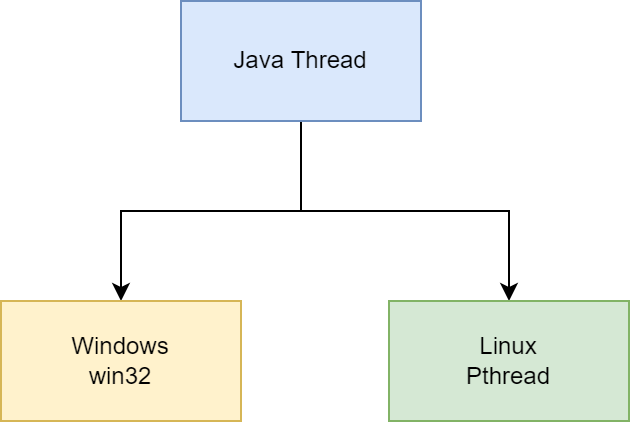
JDK1.2之前是JVM自己实现的线程管理(Green Threads),JDK1.2及以后,JVM调用操作系统的线程库API,使用操作系统原生的内核级线程。由操作系统负责管理线程调度
线程创建
继承 Thread 类
class MyThread extends Thread {
    @Override
    public void run() {
        System.out.println("start new thread!");
    }
}

 public class Main {
     public static void main(String[] args) {
        MyThread t = new MyThread();
        t.start();
    }
}
实现 Runnable 接口
class MyRunnable implements Runnable {
    @Override
    public void run() {
        System.out.println("start t1 thread!");
    }
}

public class Main {
    public static void main(String[] args) {
        Thread t1 = new Thread(new MyRunnable());
        t1.start();

        Thread t2 = new Thread(() -> {
            System.out.println("start t2 thread!");
        });
        t2.start();
    }
}
实现 Callable 接口
public class MyCallable implements Callable<Integer> {
    public Integer call() {
        return 1;
    }
}

public static void main(String[] args) throws ExecutionException, InterruptedException {
    MyCallable mc = new MyCallable();
    FutureTask<Integer> ft = new FutureTask<>(mc);
    Thread thread = new Thread(ft);
    thread.start();
    System.out.println(ft.get());
}
线程状态转换
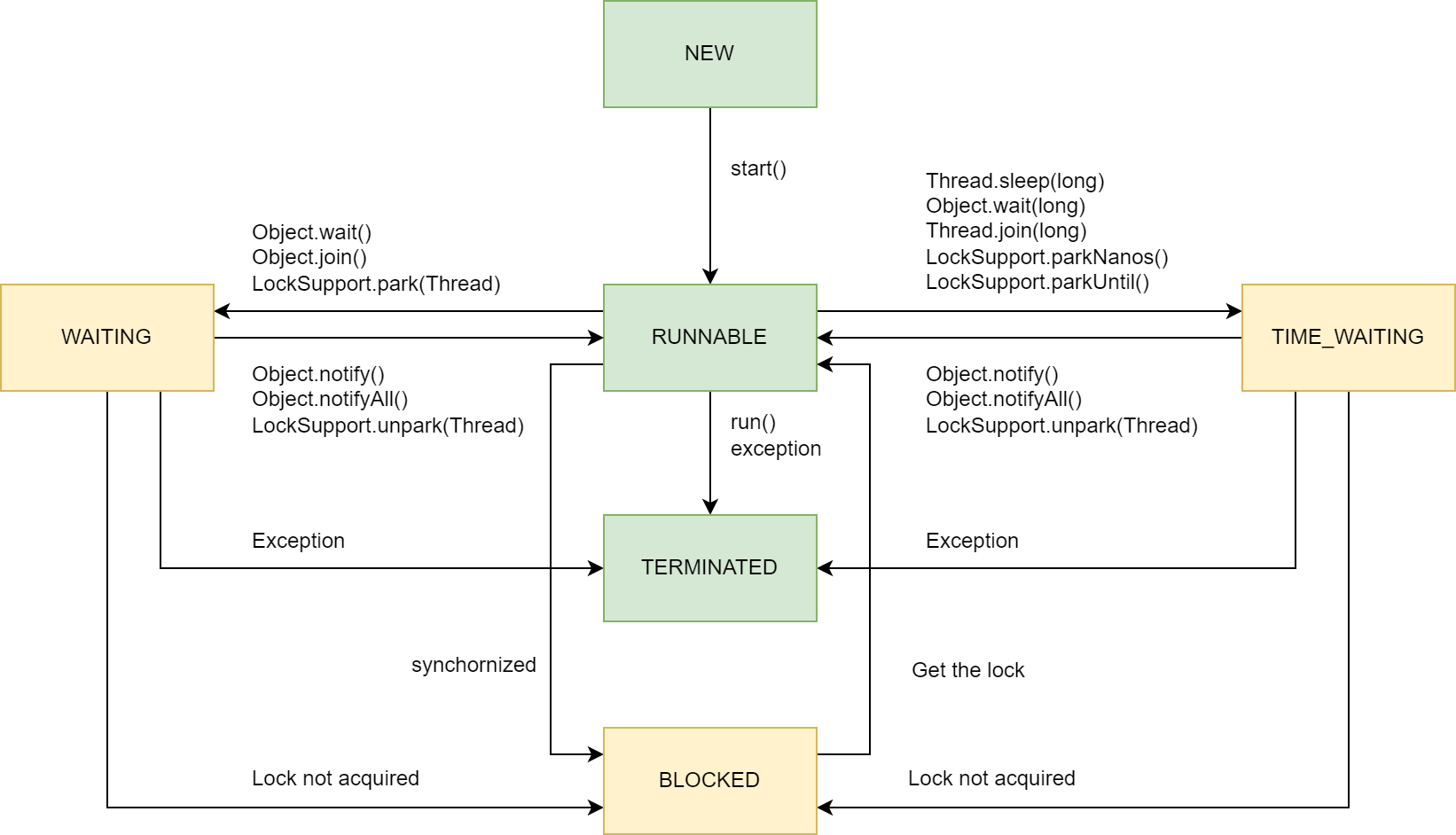
New: 新建
- 创建后未启动
Runnable:可运行
- 可能正在运行,也可能正在等待CPU时间片
- 包含操作系统线程状态中的Running和Ready
Blocking:阻塞
- 等待获取一个排它锁,如果其它线程释放了锁就会结束此状态
Waiting:无限等待
- 等待其它线程显式地唤醒,否则不会被分配 CPU 时间片
- 进入方法
- 没有设置 Timeout 参数的 Object.wait() 方法
- 没有设置 Timeout 参数的 Thread.join() 方法
- LockSupport.park() 方法
- 退出方法
- Object.notify() / Object.notifyAll()
- 被调用的线程执行完毕
Timed Waiting:限期等待
- 无需等待其它线程显式地唤醒,在一定时间之后会被系统自动唤醒
- 进入方法
- Thread.sleep() 方法
- 设置了 Timeout 参数的 Object.wait() 方法
- 设置了 Timeout 参数的 Thread.join() 方法
- LockSupport.parkNanos() 方法
- LockSupport.parkUntil() 方法
- 退出方法
- 时间结束
- 时间结束 / Object.notify() / Object.notifyAll()
- 时间结束 / 被调用的线程执行完毕
Terminated:死亡
- 可以是线程结束任务之后自己结束,或者产生了异常而结束
线程方法
setDaemon()
守护线程
public static void main(String[] args) {
    Thread thread = new Thread(new MyRunnable());
    thread.setDaemon(true);
}
sleep()
线程休眠,sleep() 可能会抛出 InterruptedException,因为异常不能跨线程传播回 main() 中,因此必须在本地进行处理。线程中抛出的其它异常也同样需要在本地进行处理
public class InterruptExample {
    private static class MyThread1 extends Thread {
        @Override
        public void run() {
            try {
                Thread.sleep(2000);
                System.out.println("Thread run");
            } catch (InterruptedException e) {
                e.printStackTrace();
            }
        }
    }
}
public static void main(String[] args) throws InterruptedException {
    Thread thread1 = new MyThread1();
    thread1.start();
    thread1.interrupt();
    System.out.println("Main run");
}
yield()
对静态方法 Thread.yield() 的调用声明了当前线程已经完成了生命周期中最重要的部分,可以切换给其它线程来执行。该方法只是对线程调度器的一个建议,而且也只是建议具有相同优先级的其它线程可以运行。
public void run() {
    Thread.yield();
}
interrupted()
通过调用一个线程的 interrupt() 来中断该线程,如果该线程处于阻塞、限期等待或者无限期等待状态,那么就会抛出 InterruptedException,从而提前结束该线程。但是不能中断 I/O 阻塞和 synchronized 锁阻塞。
如果一个线程的 run() 方法执行一个无限循环,并且没有执行 sleep() 等会抛出 InterruptedException 的操作,那么调用线程的 interrupt() 方法就无法使线程提前结束。但是调用 interrupt() 方法会设置线程的中断标记,此时调用 interrupted() 方法会返回 true。因此可以在循环体中使用 interrupted() 方法来判断线程是否处于中断状态,从而提前结束线程。
public class InterruptExample {

    private static class MyThread2 extends Thread {
        @Override
        public void run() {
            while (!interrupted()) {
                // ..
            }
            System.out.println("Thread end");
        }
    }
}

public static void main(String[] args) throws InterruptedException {
    Thread thread2 = new MyThread2();
    thread2.start();
    thread2.interrupt();
}
线程间协作
join()
在线程中调用另一个线程的 join() 方法,会将当前线程挂起,而不是忙等待,直到目标线程结束。
对于以下代码,虽然 b 线程先启动,但是因为在 b 线程中调用了 a 线程的 join() 方法,b 线程会等待 a 线程结束才继续执行,因此最后能够保证 a 线程的输出先于 b 线程的输出。
public class JoinExample {

    private class A extends Thread {
        @Override
        public void run() {
            System.out.println("A");
        }
    }

    private class B extends Thread {

        private A a;

        B(A a) {
            this.a = a;
        }

        @Override
        public void run() {
            try {
                a.join();
            } catch (InterruptedException e) {
                e.printStackTrace();
            }
            System.out.println("B");
        }
    }

    public void test() {
        A a = new A();
        B b = new B(a);
        b.start();
        a.start();
    }
}

public static void main(String[] args) {
    JoinExample example = new JoinExample();
    example.test();
}
wait() notify() notifyAll()
调用 wait() 使得线程等待某个条件满足,线程在等待时会被挂起,当其他线程的运行使得这个条件满足时,其它线程会调用 notify() 或者 notifyAll() 来唤醒挂起的线程。
它们都属于 Object 的一部分,而不属于 Thread
只能用在同步方法或者同步控制块中使用,否则会在运行时抛出 IllegalMonitorStateExeception
使用 wait() 挂起期间,线程会释放锁。这是因为,如果没有释放锁,那么其它线程就无法进入对象的同步方法或者同步控制块中,那么就无法执行 notify() 或者 notifyAll() 来唤醒挂起的线程,造成死锁。
wait() 和 sleep() 的区别:
wait() 是 Object 的方法,而 sleep() 是 Thread 的静态方法
wait() 会释放锁,sleep() 不会
public class WaitNotifyExample {
    public synchronized void before() {
        System.out.println("before");
        notifyAll();
    }

    public synchronized void after() {
        try {
            wait();
        } catch (InterruptedException e) {
            e.printStackTrace();
        }
        System.out.println("after");
    }
}

public static void main(String[] args) {
    ExecutorService executorService = Executors.newCachedThreadPool();
    WaitNotifyExample example = new WaitNotifyExample();
    executorService.execute(() -> example.after());
    executorService.execute(() -> example.before());
}
示例
class TaskQueue {
    Queue<String> queue = new LinkedList<>();

    public synchronized void addTask(String s) {
        this.queue.add(s);
        this.notifyAll();
    }

    public synchronized String getTask() throws InterruptedException {
        while (queue.isEmpty()) {
            this.wait();
        }
        return queue.remove();
    }
}
ThreadLocal
ThreadLocal相当于是线程私有的全局变量
public class HelloJava {
    public static class User {
        public String name;
        public Integer age;
    }

    private  static final ThreadLocal<User> threadLocalUser = new ThreadLocal<>();

    public void test() {
        User user = new User();
        try {
            threadLocalUser.set(user);
            test2();
        } finally {
            threadLocalUser.remove();
        }
    }

    public void test2() {
        User user = threadLocalUser.get();
    }
}
ReentrantReadWriteLock
ReentrantReadWriteLock具有读锁共享,写锁独占,可重入性
import java.util.concurrent.locks.ReentrantReadWriteLock;

public class ReentrantReadWriteLockExample {
    private ReentrantReadWriteLock lock = new ReentrantReadWriteLock();
    private int sharedResource = 0;

    public int readData() {
        lock.readLock().lock();
        try {
            // 读取共享资源
            return sharedResource;
        } finally {
            lock.readLock().unlock();
        }
    }

    public void writeData(int value) {
        lock.writeLock().lock();
        try {
            // 写入共享资源
            sharedResource = value;
        } finally {
            lock.writeLock().unlock();
        }
    }
}
ReentrantLock
ReentrantLock具有可重入性和公平性
import java.util.concurrent.locks.ReentrantLock;

public class ReentrantLockExample {
    private ReentrantLock lock = new ReentrantLock();

    public void performTask() {
        lock.lock();
        try {
            // 执行需要同步的代码块
        } finally {
            lock.unlock();
        }
    }
}
LockSupport
LockSupport主要用于线程的阻塞和唤醒,相当于Object类中的wait()和notify()的升级版
FutureTask
FutureTask可用于异步获取执行结果或取消执行任务的场景
import java.util.concurrent.Callable;
import java.util.concurrent.ExecutionException;
import java.util.concurrent.FutureTask;

public class FutureTaskExample {
    public static void main(String[] args) {
        // 创建一个 Callable 任务
        Callable<Integer> callableTask = () -> {
            Thread.sleep(2000); // 模拟长时间运行的任务
            return 42; // 任务返回的结果
        };

        // 创建 FutureTask
        FutureTask<Integer> futureTask = new FutureTask<>(callableTask);

        // 启动线程来执行任务
        Thread thread = new Thread(futureTask);
        thread.start();

        // 在任务执行的同时可以做其他事情
        System.out.println("Doing other work while waiting for the result...");

        try {
            // 获取任务的结果,若任务未完成则会阻塞
            Integer result = futureTask.get();
            System.out.println("The result is: " + result);
        } catch (InterruptedException | ExecutionException e) {
            e.printStackTrace();
        }
    }
}